Transcription settings
Open Settings → App → Transcription to choose the speech-to-text model and language used by recording, import, and always-on listening.
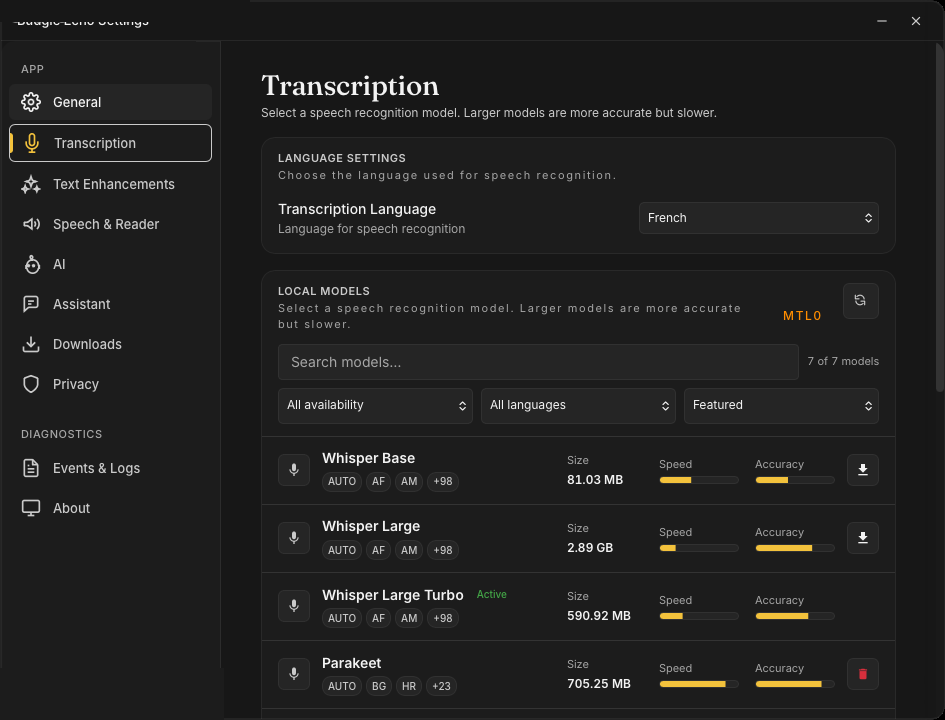
Language
Transcription Language picks the language supplied to speech recognition: Auto-detect or a fixed language. With a local model active, the list is restricted to the languages that model supports, and auto-detection may be unavailable — Echo says so explicitly when that is the case.
Local models
The current Transcription screen presents the local catalogue as a browsable list with search, availability and language filters, and a sort control. The list can change as supported backends and releases change, so this guide does not freeze model names or sizes. Each row shows the languages it covers, its download size, and comparable speed and accuracy indicators; a recommendation badge highlights the model Echo suggests for your hardware.
Each row can expose these actions and states:
- Download acquires a model that is not yet on this computer.
- Select activates a downloaded model and rebuilds the transcription engine for it.
- Delete removes a downloaded inactive model.
- Active identifies the model your recordings will use.
Only one local transcription model is active at a time. Model acquisition needs network access and enough disk space; transcription with a selected local model runs on the computer.
Model settings
The visible panel exposes:
| Setting | Effect |
|---|---|
| Unload model after (minutes) — the model TTL | How many minutes the model remains loaded after use. A longer TTL trades memory for a faster next transcription; 0 unloads immediately. |
| Compute device | Which processor runs the model: Automatic prefers a dedicated GPU over an integrated one, or an explicit GPU or CPU only. Changing it takes effect the next time a model loads. |
Developer mode can reveal additional rows — Batch Segment Duration and Min Segment Length under Segmentation, and an Advanced STT expander with low-level engine parameters (Suppress Blank, Suppress Non-Speech, Timestamps, Split on Word, the No-Speech and Word thresholds, Temperature, Beam Size, Threads, Max Context, and Max Length). Change one value at a time and keep a record of the previous value; those controls can affect speed, segmentation, and recognition quality.
Continuous listening
Always-on listening starts the in-memory background listener used for snippet trigger phrases. It requires a downloaded, selected local model; see Recording for the full behaviour.
Network boundaries
The catalogue you see is local-first, and the cloud-model section is not exposed while the server catalogue is being stabilised. Do not treat an old screenshot or a persisted cloud identifier as a supported current selection.
Network activity can still occur when Echo:
- fetches the current catalogue or downloads a model;
- authenticates the account or refreshes quota information;
- uses a separately selected cloud AI provider or custom endpoint after transcription.
Local speech recognition does not make the rest of a workflow local. Review AI provider profiles, Privacy & Data, and every workflow action that can transmit text.
If a model will not activate
Confirm that the download completed (the Downloads panel shows transfer state), select the model again, and inspect Settings → Diagnostics → Events & Logs. If always-on reports that no model is configured, activation did not complete even if model files exist on disk.