Reader
Reader is Echo's local read-aloud window. It imports a document or a public web page, keeps a normalized local copy, and reads it one sentence at a time through Echo's speech service configured under Speech & Reader. Playback runs in the background service, so closing the Reader window does not stop the reading.
Open Reader from the popup's Reader action or the tray menu.
Library
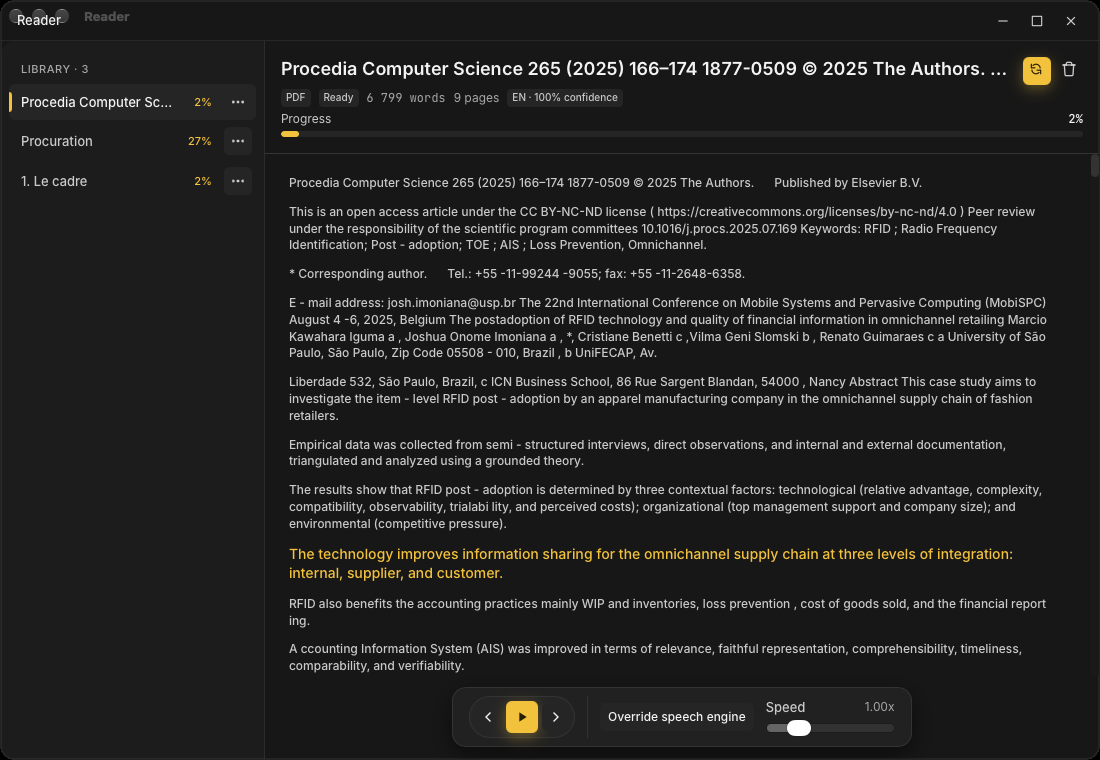
The Reader window has two panes: a library rail on the left and the document view on the right. The rail lists every imported document with its reading progress, page count, and the date you last opened it, and can be resized.
Three ways to bring text in:
- Open file picks a local document.
- Open URL fetches a public
http(s)page. Reader keeps the article text only; the address itself is not saved, and pages behind a sign-in or paywall cannot be fetched. - Try sample imports a short built-in document so you can try playback before importing anything of your own.
Supported formats are TXT, Markdown, DOCX, and public web pages. PDF is not supported yet, and Reader does not perform OCR — a scanned or image-only document cannot be read.
The row menu opens, resumes, or deletes a document. Removing a document deletes only Reader's copy and its progress; the original file or web page is never deleted or modified.
Document view
The document view shows the title, the source format, the current status (Ready, Reading, or Paused), the word and page counts, the detected language with a confidence value, and a progress bar. Every sentence is clickable, and selecting one jumps playback there.
Follow keeps the active sentence scrolled into view while reading. Scrolling manually suspends Follow until you turn it back on, so you can skim ahead without interrupting playback.
Playback controls
The playback dock at the bottom of the window provides Previous sentence, Play/Pause, and Next sentence, plus a speed slider from 0.75x to 2x.
Override speech engine expands the dock to expose the engine and voice selects for this document: the same Automatic, System, and local neural options as the Speech & Reader settings, with a per-language voice list. A download prompt appears when you pick a local neural voice whose files are not on the device yet.
The highlighted sentence follows playback. Reader and the main popup share the same speech engine and voice settings, so a voice confirmed with Test voice in Settings is the voice Reader uses by default.
Background reading and the quick reader
Because playback runs in Echo's background service, you can close the Reader window while it reads. When a reading is active, the main popup can host a compact quick reader with its own Pause/Resume and Close controls, so a long article can keep playing while you dictate. Quitting Echo flushes the current sentence position first, so resume stays accurate.
Progress is stored per document. Reopening — even after restarting Echo — resumes at the exact sentence you left.
Imported content, page text, and playback state stay local; see Privacy & Data for the storage locations.