History
The History window is Echo's archive of transcriptions and the place to import or rework audio. Open it from the popup's History and Import action or the tray menu. A sidebar switches between four tabs: History, Recovery, Import, and Merge.
Browse the list
The History tab lists saved entries grouped by date, with text search and date filters. Select entries to build a merge set, or expand one entry to inspect it. The row menu can include Copy to clipboard, Open File Location for retained media, Reprocess to run available audio through transcription again, Apply workflow (including Clean with Scribe), Show info, and Delete — deletion asks for confirmation and is permanent.
At the bottom of the list, Purge all history… deletes every entry after an explicit confirmation. Use it only when you are certain you will not need any transcript or retained media.
Inspect an entry
An expanded entry shows the transcription plus the processing information stored for that entry. When both raw and processed versions exist, switch between the original text and workflow results; individual processing steps can be inspected or deleted without touching the transcription. Media actions appear only when Echo retained an audio path, and workflow views depend on what actually ran.
Import audio
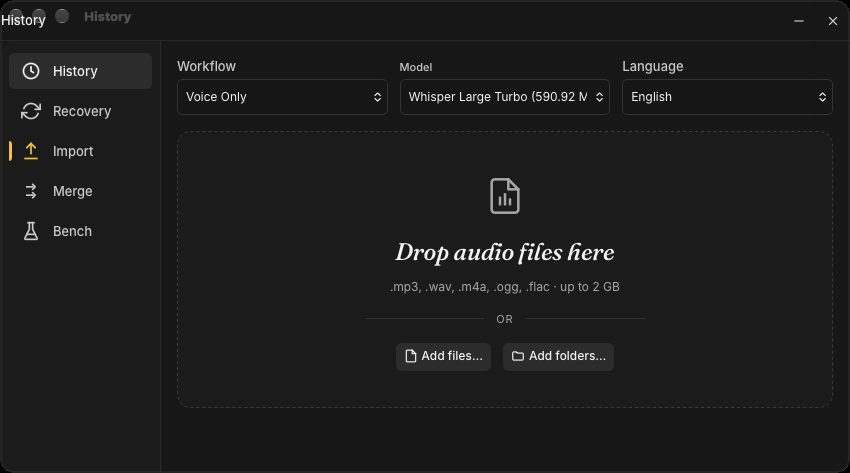
The Import tab accepts audio and video files — common formats such as MP3, WAV, M4A, OGG, and FLAC, up to 2 GB each. Drop them on the zone or use Add files… / Add folders… (a folder scan finds audio and video inside and reports how many it added). Before starting, choose a downloaded speech-to-text model, a language, an optional workflow treatment, and whether to Merge into one entry instead of one entry per file.
Echo reports decode, segmentation, and transcription progress for each queued file and saves the results as normal History entries. Closing the window while an import is active asks for confirmation because closing cancels pending transcriptions.
Recover interrupted sessions
The Recovery tab scans for interrupted recording sessions — for example after a crash or a forced shutdown. A recoverable session can be stitched back into a usable audio file and passed to the Import queue, or restored as a History entry when enough data exists.
Merge transcripts
Select at least two History entries, send them to the Merge tab, and reorder them. Each source can optionally run an existing workflow before the merge, and a separate post-merge workflow can run once on the combined result. Create merged history entry combines the existing transcripts without calling the raw transcription pipeline again; deleting the original entries is an explicit optional setting.
Privacy warning
History can contain sensitive transcripts, workflow outputs, metadata, and retained audio. Review an entry before copying, sharing a screenshot, opening its folder, or sending its content through a network-bound workflow. Delete only after confirming whether you still need the transcript or media.
For documented network boundaries, see Privacy & Data.